WordPress is one of the most popular content management platforms in the world, powering millions of websites. Until now, integrating Entangle into a WordPress website required some technical skill; previously, you had to use a plugin that allowed you to include custom JavaScript, CSS, and HTML. While the three lines of code we promise on our homepage offer a seamless integration — and are not overly complicated for a technical user — the process can still be daunting for non-technical users managing their own websites.
We are always happy to work with you and provide technical assistance every step of the way to get Entangle incorporated into your site. However, this can sometimes create friction, as it requires granting administrative access to your WordPress dashboard.
Today, we are excited to release a standalone WordPress plugin. This allows you to easily include the Entangle AI chatbot on your website within minutes, without requiring additional plugins or manual code editing in your WordPress theme.
- Download the plugin available on GitHub - https://github.com/entangle-cloud/entangle-wordress
- Read the full documentation on how to use the plugin - https://docs.entangle.cloud/wordpress
How to use the Entangle WordPress plugin?
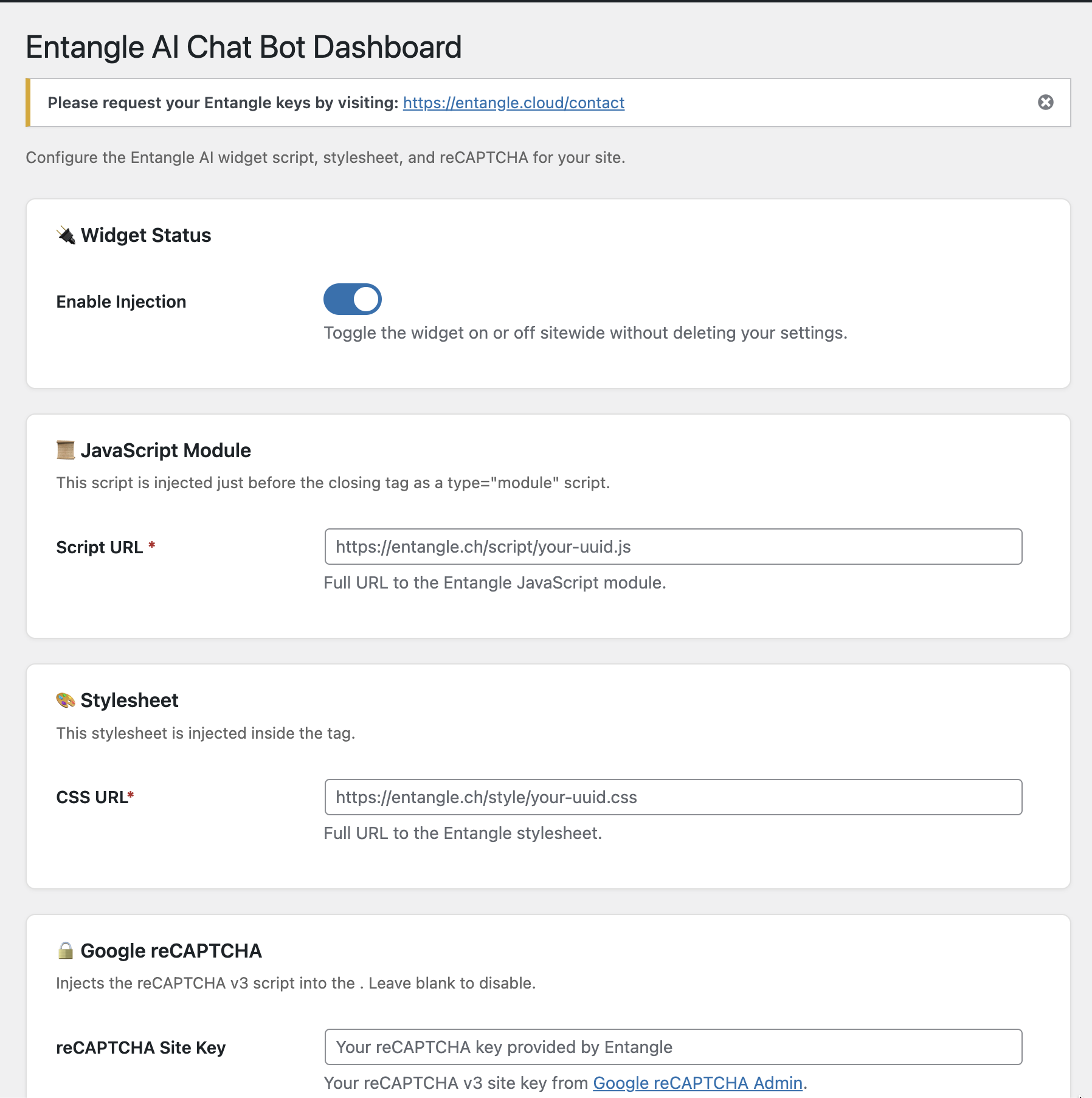 Entangle WordPress plugin page
You can install the plugin just as you would any other WordPress plugin by uploading the ZIP file. Since the code is fully open-source, it is completely transparent and can be reviewed for safety. (Note: We have submitted the plugin to the official WordPress Plugin Directory and are currently waiting for it to be listed.)
It’s super simple to use, too, with zero technical know-how required. All you have to do is fill in the CSS, JavaScript, and Google reCAPTCHA fields provided by Entangle within the plugin settings. As soon as you hit the save button, your AI agents will be up and running on your WordPress website.
Here is a quick breakdown of what they do:
- CSS (The “Look”): Think of CSS as the interior design. It tells the chatbot what color to be, what fonts to use, and how to match your website’s unique style.
- JavaScript (The “Brain”): This is the engine under the hood. It’s the magic that allows the chatbot to actually work — opening the window, processing questions, and sending back replies.
- Google reCAPTCHA (The “Security Guard”): This is a simple shield from Google. It sits at the door to make sure your AI is talking to real humans and not annoying spam bots.
We look forward to getting this into the official WordPress Plugin Directory and seeing how things turn out. If you are using a WordPress website and want to add an AI agent to chat with and support your visitors, give Entangle a try! We look forward to hearing from you soon.
Entangle also has many more internal integration mechanisms available to easily “plug and play” with your favorite frameworks, such as Docusaurus, GitLab, and more.
Contact Entangle to add your AI agent to your WordPress website